
Intranet Dashboard
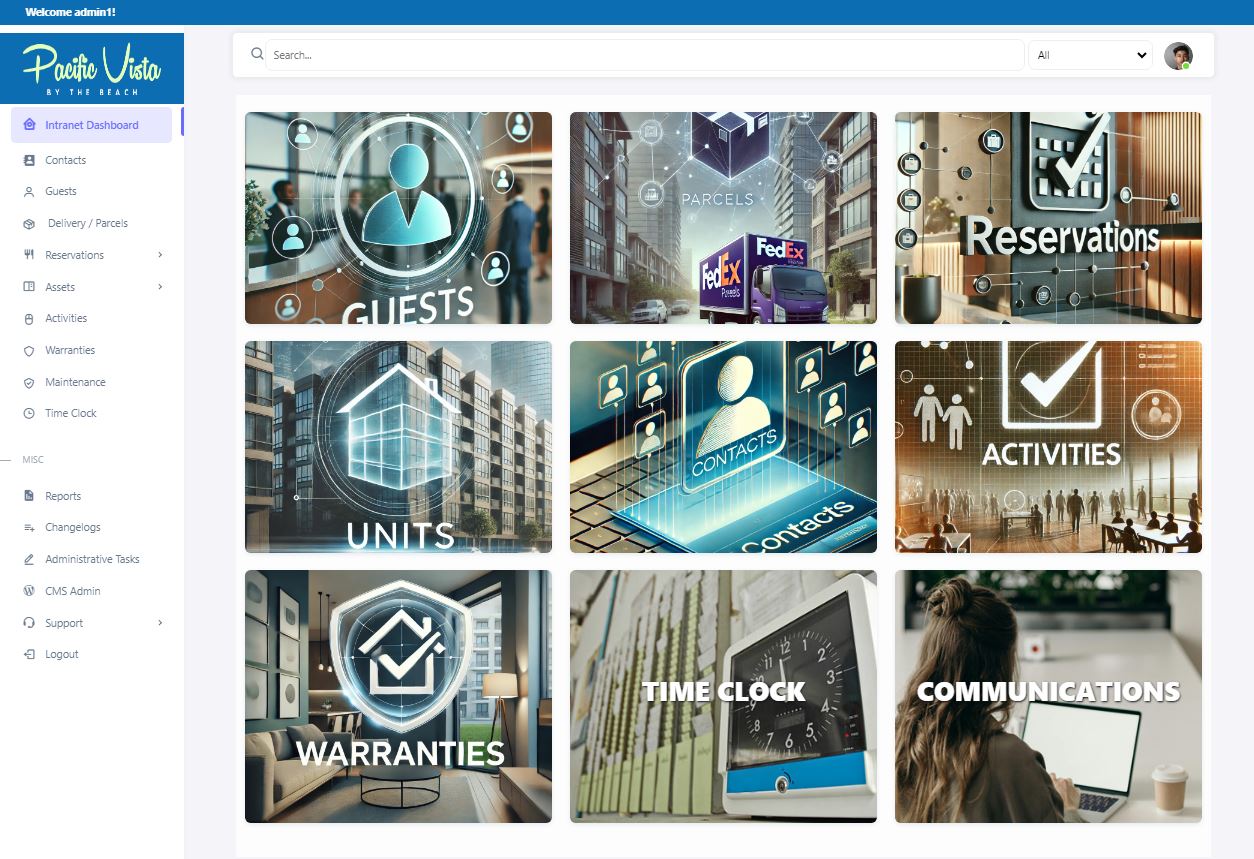
The Intranet Dashboard is a centralized hub designed to streamline facility management and enhance user experiences. Each section offers specialized tools and resources for efficient operations. Here's a breakdown:
- Guest: Tools for managing guest profiles, check-ins, check-outs, and other guest-related services.
- Delivery / Parcel: Handling of deliveries and parcels, including tracking, notifications, and pickup information for guests or staff.
- Reservations: Managing reservations for accommodation or other services offered by the facility. This includes booking, modifying, and cancelling reservations.
- Units: Information about the available units, such as rooms, apartments, or other types of accommodation. This section might include details about unit availability, features, and maintenance status.
- Contacts: A directory of important contacts, including staff, departments, and external service providers. This can help guests and staff quickly find and communicate with the right people.
- Activities: Information about activities available at the facility, such as recreational events, fitness classes, or excursions. This section can help guests plan their activities during their stay.
- Warranties: Details about warranties related to the facility's equipment, units, or other services. This might include warranty periods, coverage details, and how to claim a warranty.
- Time Clock: A tool for staff to clock in and out, manage their working hours, and track their attendance.
- Communications: Centralize communication tools for sending updates, announcements, and important messages to residents, staff, or other stakeholders.
In addition to these main sections, the left sidebar includes miscellaneous options for:
- Reports: Generate detailed reports related to Guests, Activities, Deliveries, Warranties, Contacts, Units, and Pets. This tool helps both users and administrators review key metrics and ensure smooth operations.
- Changelogs: Access records of system updates and modifications.
- Administrative Tasks: Tools and resources for administrative tasks, such as approvals, scheduling, and other backend processes.
- CMS Admin: Content Management System administration for managing the facility’s website and internal content.
- Support: A resource hub where users and administrators can:
- Access Documentation for system features and operational guides.
- Submit feedback via the Feedback Form to share suggestions or concerns.
- Report technical issues using the Bug Report tool.
- Logout: Securely log out of the intranet system.
Each section is tailored to streamline operations, enhance guest experiences, and provide staff with the tools they need to manage the facility efficiently.