
Activities
Providing clear and detailed information about available activities enables guests to make informed choices, enhances their engagement, and ensures a more enjoyable and organized stay. This section also promotes the facility’s offerings and can improve overall guest satisfaction.
Please find attached the video for the Activities.
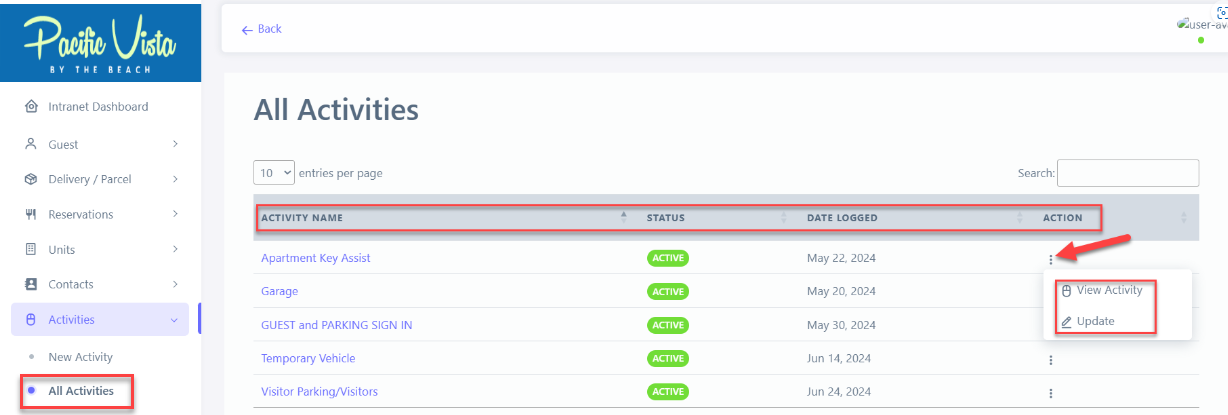
- All Activities - You can view all activity names, statuses, and logged dates. Additionally, you can also view and update activities as needed by clicking the three-dot icon under "Actions."
Watch the Comprehensive Step-by-Step Instructions on "Activities".
Follow these Steps to Activities.:
- Click "Activities"
- Click "New Activity"
- Click "Activity Type" choose from the list the activity type that you want.
- Go to "Origin" option list, choose from there.
- Choose the appropriate "Recipient Unit".
- Kindly provide your desired "Comments"
- Select the desired "Person Responsible"
- Type in the correct "Phone #".
- Type in the "Quantity"
- Enter the correct "Duration Start" and "Duration End".
- Click here "Specific date"
- Click the desired "Date" and Click "Done"
- Click "Save Activity"
Please find the link to the Capture Step-By-Step reference guide for Activities. Activities pdf.pdf
✅ Tips for Creating Effective Activities:
- Define Objectives
Know the purpose of the activity and desired outcomes - Give Clear Instructions
Ensure participants understand what to do and expected results.